
Jenkins is an open-source automation server that facilitates software projects’ continuous integration and delivery (CI/CD). It provides a framework for automating applications’ building, testing, and deployment, enabling teams to streamline their software development processes.
With Jenkins, developers can set up a pipeline defining the steps required to build, test, and deploy their applications. These steps can include tasks like compiling source code, running unit tests, packaging the application, deploying it to a staging environment for further testing, and finally deploying it to production.
Jenkins supports integration with various version control systems, such as Git, Subversion, and Mercurial, allowing it to automatically trigger builds and tests whenever changes are pushed to the repository. It also integrates with a wide range of tools and technologies, including build tools, testing frameworks, and deployment platforms.
Jenkins provides a web-based interface that allows users to configure and manage their build pipelines and monitor the status of builds. It offers a vast ecosystem of plugins, which extend its functionality and allow integration with additional tools and services.
Why we used Jenkins?
Jenkins is used for several reasons in software development projects. Here are some key reasons why Jenkins is commonly used:
1. Continuous Integration (CI): Jenkins facilitates continuous integration by automatically building and testing software whenever changes are made to the codebase. It helps identify issues and conflicts early in the development process, leading to faster feedback and easier bug resolution
2. Automated Testing: Jenkins allows the integration of automated testing frameworks into the build process. It can execute unit tests, integration tests, and other types of tests to ensure that the software functions as expected and meets the defined quality criteria.
3.Continuous Delivery and Deployment (CD): Jenkins enables continuous delivery and deployment by automating the steps involved in packaging, deploying, and releasing software. It streamlines the release process, reduces human error, and allows for frequent and reliable software deployments.
4. Build and Release Management: Jenkins provides a centralized platform for managing build configurations, artifacts, and release versions. It tracks changes, manages dependencies, and ensures consistency across different builds and environments.
5. Scalability and Flexibility: Jenkins is highly scalable and can support projects of various sizes and complexities. It can handle multiple builds concurrently and distribute work across multiple nodes for faster execution. Jenkins also offers extensive plugin support, allowing integration with a wide range of tools and technologies.
6. Community and Ecosystem: Jenkins has a large and active community of users and contributors. This vibrant ecosystem offers a vast array of plugins, documentation, and community support, making it easier to extend Jenkins’ functionality and find solutions to common challenges.
7. Open Source and Cost-Effective: Jenkins is an open-source tool, which means it is freely available for use and can be customized as per project requirements. This makes it a cost-effective choice compared to commercial alternatives.
In summary, Jenkins is used to automate build, test, and deployment processes, improve software quality, enable continuous integration and delivery, and provide a flexible and scalable platform for managing software development projects.
Disadvantages of Jenkins
While Jenkins is a widely used and popular tool for automation and continuous integration, it does have some potential disadvantages:
1. Complexity: Jenkins can be complex to set up and configure, especially for beginners or teams without prior experience with CI/CD tools. The initial learning curve can be steep, requiring time and effort to understand its features, concepts, and configuration options.
2.Scalability Challenges: While Jenkins can scale to handle large projects, managing and scaling Jenkins infrastructure can become complex as the number of builds and users increase. It may require additional hardware resources and careful configuration to ensure smooth operation.
3. Lack of User Interface: Although Jenkins provides a web-based interface, its user interface is often considered outdated and not as intuitive as some other CI/CD tools. The interface can be overwhelming for new users, and navigation and configuration options may require additional effort to understand and use effectively.
4. Dependency on Plugins: Jenkins heavily relies on plugins to extend its functionality and integrate with other tools. While the plugin ecosystem is vast, there can be challenges when plugins are outdated, incompatible, or lack proper documentation and support.
5. Limited Support: Although Jenkins has an active community, the level of support may vary. Some plugins or specific configurations may have limited documentation or community assistance, making troubleshooting and issue resolution more challenging.
6. Resource Consumption: Jenkins can consume significant server resources, especially when running multiple builds concurrently or using resource-intensive plugins. This may require careful resource planning and allocation to ensure optimal performance.
7. Lack of Native Support for Containerization: Jenkins does not have built-in native support for containerization technologies like Docker or Kubernetes. While it is possible to integrate Jenkins with containerization tools, it may require additional configuration and customization.
It’s important to note that while Jenkins has its disadvantages, many of these challenges can be mitigated with proper planning, configuration, and familiarity with the tool.
What is a pipeline?
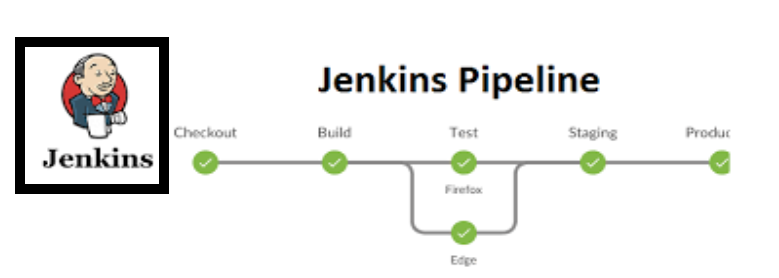
In software development and CI/CD (Continuous Integration/Continuous Deployment) practices, a pipeline refers to a sequence of automated steps or stages that code changes go through from source code to
deployment or release. It defines the workflow and series of actions required to build, test, and deliver software in a consistent and efficient manner.
A pipeline typically consists of multiple stages, each representing a distinct phase in the software delivery process. These stages can include:
1. Checkout: This stage involves retrieving the latest version of the source code from the version control system (such as Git) to begin the pipeline process.
2. Build: In this stage, the source code is compiled and built into executable artifacts or packages. It involves tasks like compiling code, resolving dependencies, and generating build artifacts.
3. Test: The test stage executes various types of tests, including unit tests, integration tests, and other automated tests, to ensure the software functions correctly and meets the specified quality criteria.
4. Static Code Analysis: This stage involves analyzing the codebase for potential issues, code style violations, security vulnerabilities, and other code quality concerns. Static code analysis tools are used to perform this analysis.
5. Deployment: The deployment stage involves deploying the built artifacts to the desired environment, such as staging or production. It may include tasks like configuring servers, setting up databases, and deploying the application or infrastructure.
6. Release: This stage handles the final steps required to release the software, such as generating release notes, updating version numbers, and notifying stakeholders about the new release.
A pipeline can be visualized as a flowchart or diagram, illustrating the sequence of stages and their dependencies. Each stage typically has defined triggers, conditions, and actions, which are configured to automatically execute based on certain events, such as code commits or a schedule.
If you have some insights, then don’t forget to share them with your network.
For any queries around DevOps and Cloud, do reach out to neel@getcloud.in !